DigitalSanctum.
Menu
Process Library

Illustrative process

Plumbing: a property maintenance work order

A property manager emails a PDF work order for a non-urgent repair at a rental property. It includes the property address, onsite contact, work-order reference and access instructions.

Carry the property, contact and work-order details forward. Add the technician’s findings as the work progresses.

Same request, same business systems

See what could change.

These models illustrate possible ways of working. They are not a client result, a live integration or an executable workflow. What works for your business depends on your tools, permissions and the checks you need.

Before

Manual handoffs

The same request is read, copied or passed between people and systems.

  1. 1. Work-order inbox

    Read the email and PDF. Find the address, contacts and reference.

  2. 2. Job record

    Type the property, job and contact details into the job system.

  3. 3. Dispatch calendar

    Copy the address and instructions while arranging a visit.

  4. 4. Technician’s job card

    Send the instructions separately and chase notes or photos afterwards.

  5. 5. Accounting invoice

    Gather the completion details and re-enter billing information.
Possible improvement

Connected handoffs

Work-order inbox and Job record. Keep the original request and check the shared record. Check the property, contact, work requested and billing details once.

Independent work can happen in parallel

Dispatch calendar

Arrange the visit

Confirm the plumber’s availability and property access.

Technician’s job card

Prepare the job pack

Reuse the checked address, instructions and work-order reference.

Booking confirmed. Job pack ready. The technician completes the work and adds time, materials, notes and photos.

Accounting invoice: Review the invoice. Prepare it from the completed job, then review before issue.

One linked job, from request to reviewed invoice.

A person still makes the decisions. Missing access details, unclear billing instructions or extra work outside the agreed scope go back to a person.

Flow reference diagrams

Explore the process.

Open a full-size diagram to inspect it. The original Flow definitions remain unpublished drafts. These reference snapshots do not run a process.

Before

Manual handoffs

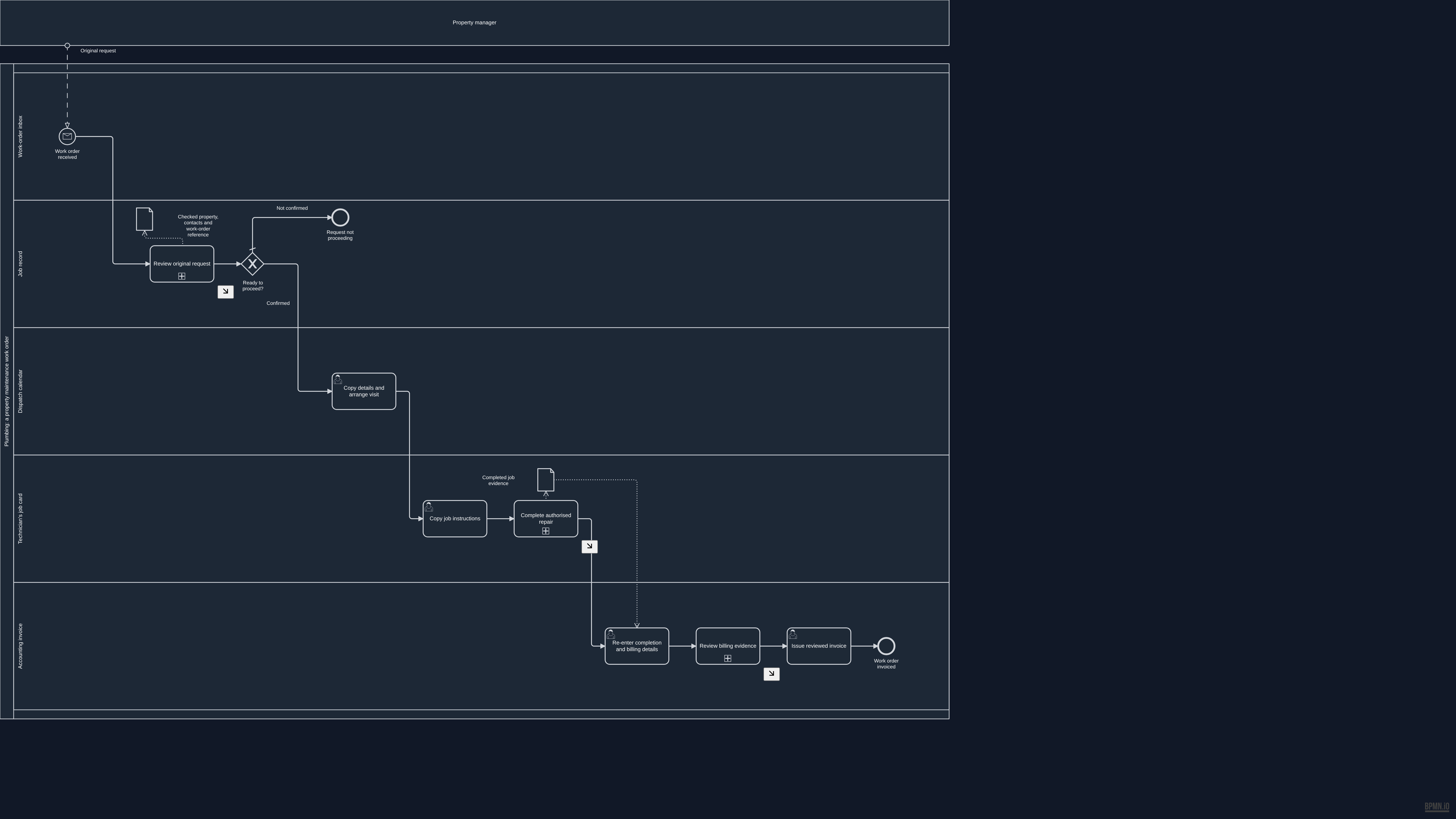
Overview BPMN diagram for Manual handoffs. The process summary above describes this example.

Open the full-size overview · Download this BPMN draft snapshot

Source and validation details

This reference was prepared from approved unpublished draft 354516da-a6a0-4cee-8b25-80b54b4bcf59. The source remains a draft and is not ready for native publication.

Source BPMN SHA-256
875ce81bf891458b43efd3c96f414e40de7e2ade84a74806cee0a66250554d31
Reference BPMN SHA-256
e01c38f9f0dc4bf52dad01f5bd07e917ece1330ea4b7295c82d9d6cb131daddd

The reference removes historical review metadata from the source documentation. The process and diagram layout are unchanged. Native validation recorded the following warnings:

  • G-40: Step 'invoice' has a name of 39 characters : may truncate in BPMN shape rendering
  • QUALITY_GATE_04: Error / Exception Paths: Zero boundary events : no error paths
  • QUALITY_GATE_08: SLA & Timing Metadata: No SLA targets set on any step
Read this diagram as text

Activities and decisions

  • Work order received (start, Work-order inbox)
  • Request not proceeding (end, Job record)
  • Copy details and arrange visit (person's task, Dispatch calendar)
  • Copy job instructions (person's task, Technician’s job card)
  • Re-enter completion and billing details (person's task, Accounting invoice)
  • Issue reviewed invoice (person's task, Accounting invoice)
  • Work order invoiced (end, Accounting invoice)
  • Review original request (detailed phase, Job record)
  • Ready to proceed? (decision, Job record)
  • Review billing evidence (detailed phase, Accounting invoice)
  • Complete authorised repair (detailed phase, Technician’s job card)
  • Checked property, contacts and work-order reference (information)
  • Completed job evidence (information)

Connections

  • Work order received → Review original request
  • Copy details and arrange visit → Copy job instructions
  • Copy job instructions → Complete authorised repair
  • Re-enter completion and billing details → Review billing evidence
  • Issue reviewed invoice → Work order invoiced
  • Review original request → Ready to proceed?
  • Ready to proceed? → Request not proceeding: Not confirmed
  • Ready to proceed? → Copy details and arrange visit: Confirmed
  • Review billing evidence → Issue reviewed invoice
  • Complete authorised repair → Re-enter completion and billing details

Incoming messages

  • Property manager → Work order received: Original request

Information used and produced

  • Re-enter completion and billing details uses Completed job evidence
  • Review original request creates Checked property, contacts and work-order reference
  • Complete authorised repair creates Completed job evidence
View detailed process diagrams
Review original request
Detailed BPMN diagram: Review original request
Read this diagram as text

Activities and decisions

  • Phase started (start, Job record)
  • Read request and re-enter details (person's task, Job record)
  • Request usable? (decision, Job record)
  • Clarify request with sender (person's task, Job record)
  • Proceed with clarified request? (decision, Job record)
  • exclusiveGateway (request-ready) (decision, Job record)
  • Needs owner decision (end, Job record)
  • Phase ready (end, Job record)

Connections

  • Phase started → Read request and re-enter details
  • Read request and re-enter details → Request usable?
  • Request usable? → exclusiveGateway (request-ready): Usable
  • Request usable? → Clarify request with sender: Needs review
  • Clarify request with sender → Proceed with clarified request?
  • Proceed with clarified request? → exclusiveGateway (request-ready): Confirmed
  • Proceed with clarified request? → Needs owner decision: Not confirmed
  • exclusiveGateway (request-ready) → Phase ready

Incoming messages

    Information used and produced

      Review billing evidence
      Detailed BPMN diagram: Review billing evidence
      Read this diagram as text

      Activities and decisions

      • Phase started (start, Accounting invoice)
      • Review completed-job invoice (person's task, Accounting invoice)
      • Details usable? (decision, Accounting invoice)
      • Clarify missing or changed details (person's task, Accounting invoice)
      • exclusiveGateway (billing-review-merge) (decision, Accounting invoice)
      • Phase ready (end, Accounting invoice)

      Connections

      • Phase started → Review completed-job invoice
      • Review completed-job invoice → Details usable?
      • Details usable? → exclusiveGateway (billing-review-merge): Usable
      • Details usable? → Clarify missing or changed details: Clarification needed
      • Clarify missing or changed details → exclusiveGateway (billing-review-merge)
      • exclusiveGateway (billing-review-merge) → Phase ready

      Incoming messages

        Information used and produced

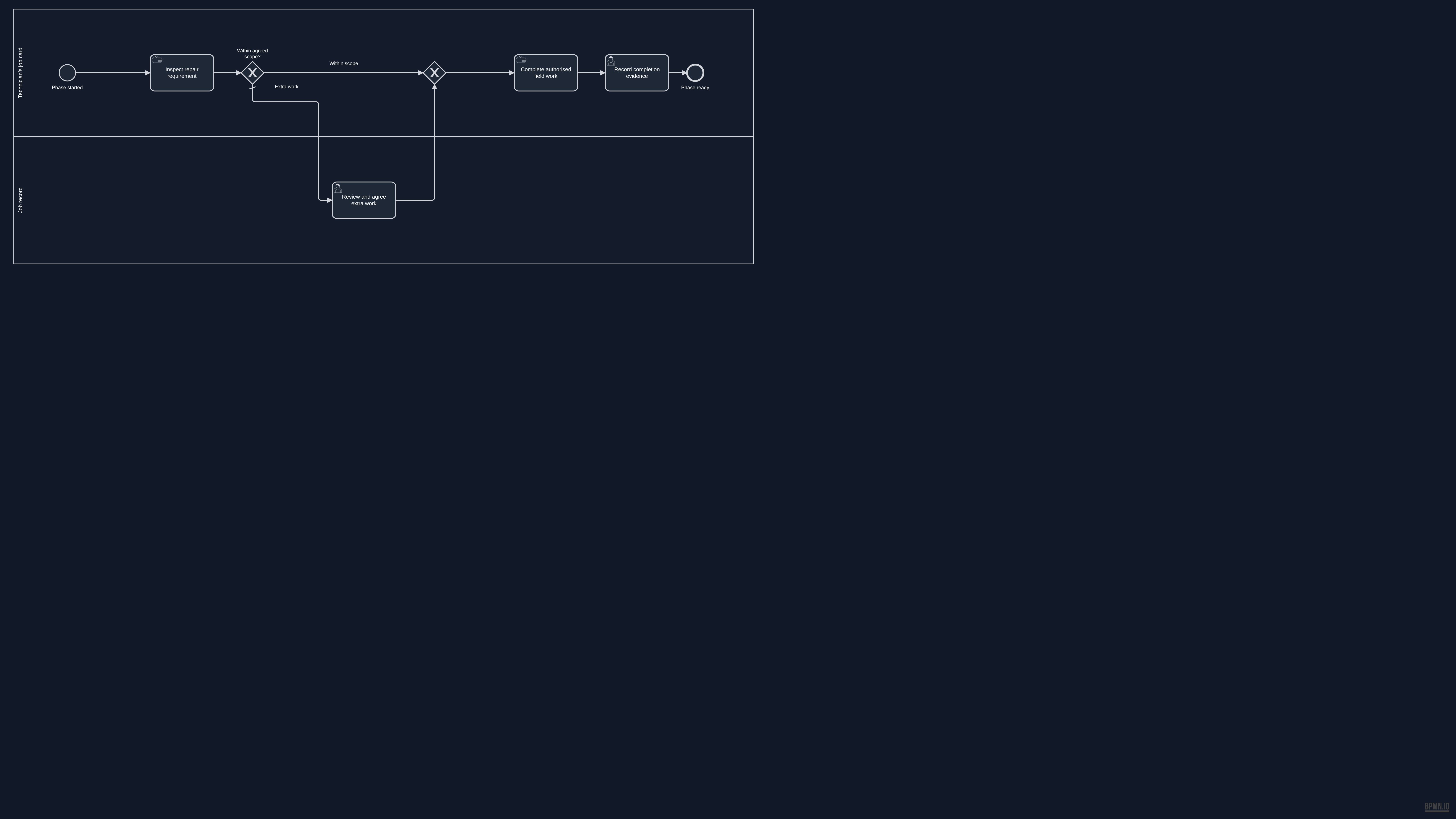
          Complete authorised repair
          Detailed BPMN diagram: Complete authorised repair
          Read this diagram as text

          Activities and decisions

          • Phase started (start, Technician’s job card)
          • Inspect repair requirement (manual task, Technician’s job card)
          • Within agreed scope? (decision, Technician’s job card)
          • Review and agree extra work (person's task, Job record)
          • exclusiveGateway (scope-merge) (decision, Technician’s job card)
          • Complete authorised field work (manual task, Technician’s job card)
          • Record completion evidence (person's task, Technician’s job card)
          • Phase ready (end, Technician’s job card)

          Connections

          • Phase started → Inspect repair requirement
          • Inspect repair requirement → Within agreed scope?
          • Within agreed scope? → exclusiveGateway (scope-merge): Within scope
          • Within agreed scope? → Review and agree extra work: Extra work
          • Review and agree extra work → exclusiveGateway (scope-merge)
          • exclusiveGateway (scope-merge) → Complete authorised field work
          • Complete authorised field work → Record completion evidence
          • Record completion evidence → Phase ready

          Incoming messages

            Information used and produced

              Possible improvement

              Connected handoffs

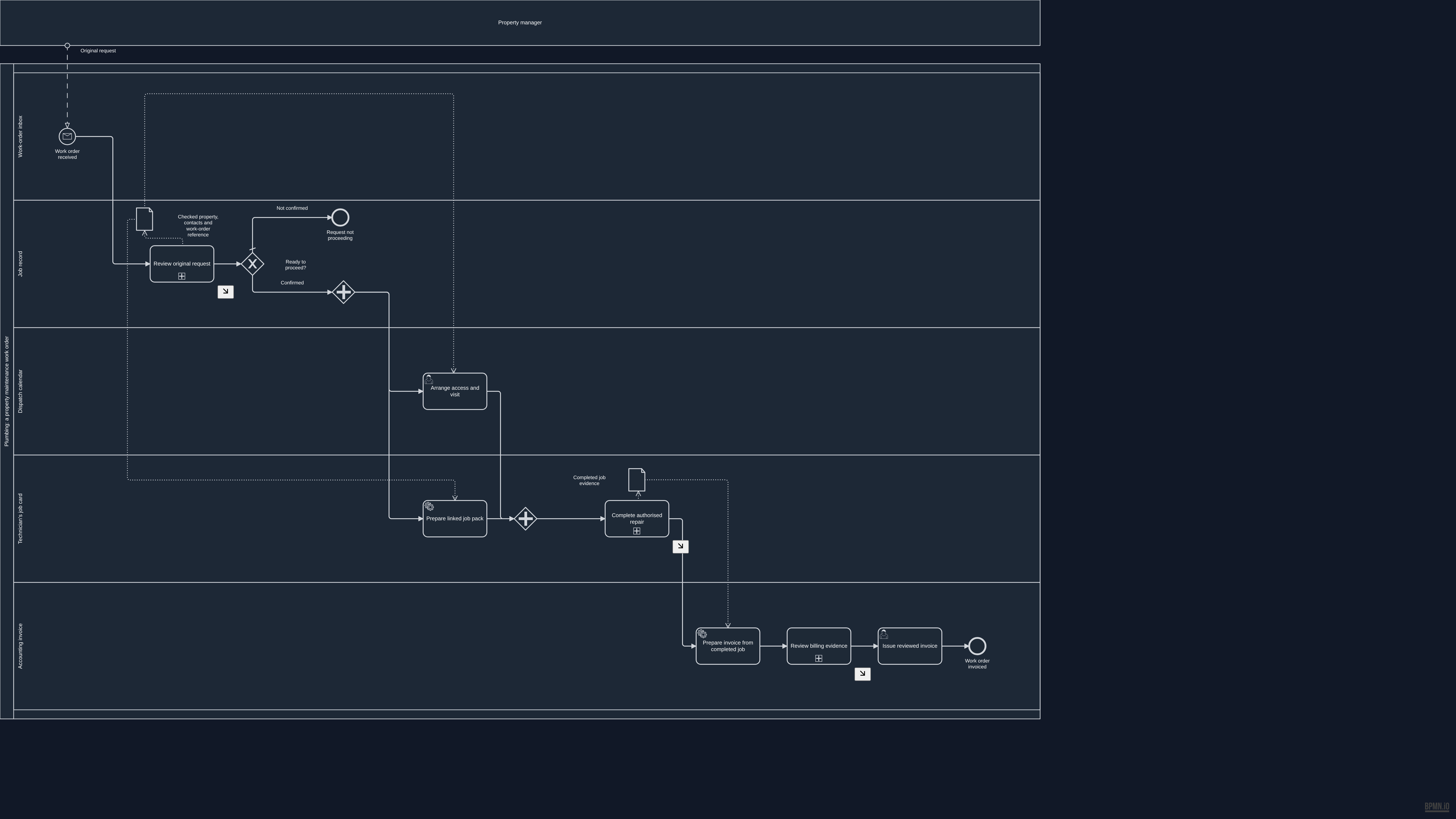
              Overview BPMN diagram for Connected handoffs. The process summary above describes this example.

              Open the full-size overview · Download this BPMN draft snapshot

              Source and validation details

              This reference was prepared from approved unpublished draft c9352b44-cb08-4f17-8822-c3b8f643c060. The source remains a draft and is not ready for native publication.

              Source BPMN SHA-256
              5fae05b85282bf8202649d1286cc2d10c4393106350a03a86be5ed142989c827
              Reference BPMN SHA-256
              d0f1732e67c4066567046a97e1596e2ff5331cab68251126028d549dd134dc18

              The reference removes historical review metadata from the source documentation. The process and diagram layout are unchanged. Native validation recorded the following warnings:

              • QUALITY_GATE_04: Error / Exception Paths: Zero boundary events : no error paths
              • QUALITY_GATE_08: SLA & Timing Metadata: No SLA targets set on any step
              • QUALITY_GATE_09: Edge Routing & Label Clarity: 2/4 gateway edges have labels
              Read this diagram as text

              Activities and decisions

              • Work order received (start, Work-order inbox)
              • Request not proceeding (end, Job record)
              • Arrange access and visit (person's task, Dispatch calendar)
              • Prepare linked job pack (proposed system task, Technician’s job card)
              • parallelGateway (prepare-fork) (parallel split or join, Job record)
              • parallelGateway (prepare-join) (parallel split or join, Technician’s job card)
              • Prepare invoice from completed job (proposed system task, Accounting invoice)
              • Issue reviewed invoice (person's task, Accounting invoice)
              • Work order invoiced (end, Accounting invoice)
              • Review original request (detailed phase, Job record)
              • Ready to proceed? (decision, Job record)
              • Review billing evidence (detailed phase, Accounting invoice)
              • Complete authorised repair (detailed phase, Technician’s job card)
              • Checked property, contacts and work-order reference (information)
              • Completed job evidence (information)

              Connections

              • Work order received → Review original request
              • Arrange access and visit → parallelGateway (prepare-join)
              • Prepare linked job pack → parallelGateway (prepare-join)
              • parallelGateway (prepare-fork) → Arrange access and visit
              • parallelGateway (prepare-fork) → Prepare linked job pack
              • parallelGateway (prepare-join) → Complete authorised repair
              • Prepare invoice from completed job → Review billing evidence
              • Issue reviewed invoice → Work order invoiced
              • Review original request → Ready to proceed?
              • Ready to proceed? → Request not proceeding: Not confirmed
              • Ready to proceed? → parallelGateway (prepare-fork): Confirmed
              • Review billing evidence → Issue reviewed invoice
              • Complete authorised repair → Prepare invoice from completed job

              Incoming messages

              • Property manager → Work order received: Original request

              Information used and produced

              • Arrange access and visit uses Checked property, contacts and work-order reference
              • Prepare linked job pack uses Checked property, contacts and work-order reference
              • Prepare invoice from completed job uses Completed job evidence
              • Review original request creates Checked property, contacts and work-order reference
              • Complete authorised repair creates Completed job evidence
              View detailed process diagrams
              Review original request
              Detailed BPMN diagram: Review original request
              Read this diagram as text

              Activities and decisions

              • Phase started (start, Job record)
              • Check shared request details (person's task, Job record)
              • Request usable? (decision, Job record)
              • Clarify request with sender (person's task, Job record)
              • Proceed with clarified request? (decision, Job record)
              • exclusiveGateway (request-ready) (decision, Job record)
              • Needs owner decision (end, Job record)
              • Phase ready (end, Job record)

              Connections

              • Phase started → Check shared request details
              • Check shared request details → Request usable?
              • Request usable? → exclusiveGateway (request-ready): Usable
              • Request usable? → Clarify request with sender: Needs review
              • Clarify request with sender → Proceed with clarified request?
              • Proceed with clarified request? → exclusiveGateway (request-ready): Confirmed
              • Proceed with clarified request? → Needs owner decision: Not confirmed
              • exclusiveGateway (request-ready) → Phase ready

              Incoming messages

                Information used and produced

                  Review billing evidence
                  Detailed BPMN diagram: Review billing evidence
                  Read this diagram as text

                  Activities and decisions

                  • Phase started (start, Accounting invoice)
                  • Review completed-job invoice (person's task, Accounting invoice)
                  • Details usable? (decision, Accounting invoice)
                  • Clarify missing or changed details (person's task, Accounting invoice)
                  • exclusiveGateway (billing-review-merge) (decision, Accounting invoice)
                  • Phase ready (end, Accounting invoice)

                  Connections

                  • Phase started → Review completed-job invoice
                  • Review completed-job invoice → Details usable?
                  • Details usable? → exclusiveGateway (billing-review-merge): Usable
                  • Details usable? → Clarify missing or changed details: Clarification needed
                  • Clarify missing or changed details → exclusiveGateway (billing-review-merge)
                  • exclusiveGateway (billing-review-merge) → Phase ready

                  Incoming messages

                    Information used and produced

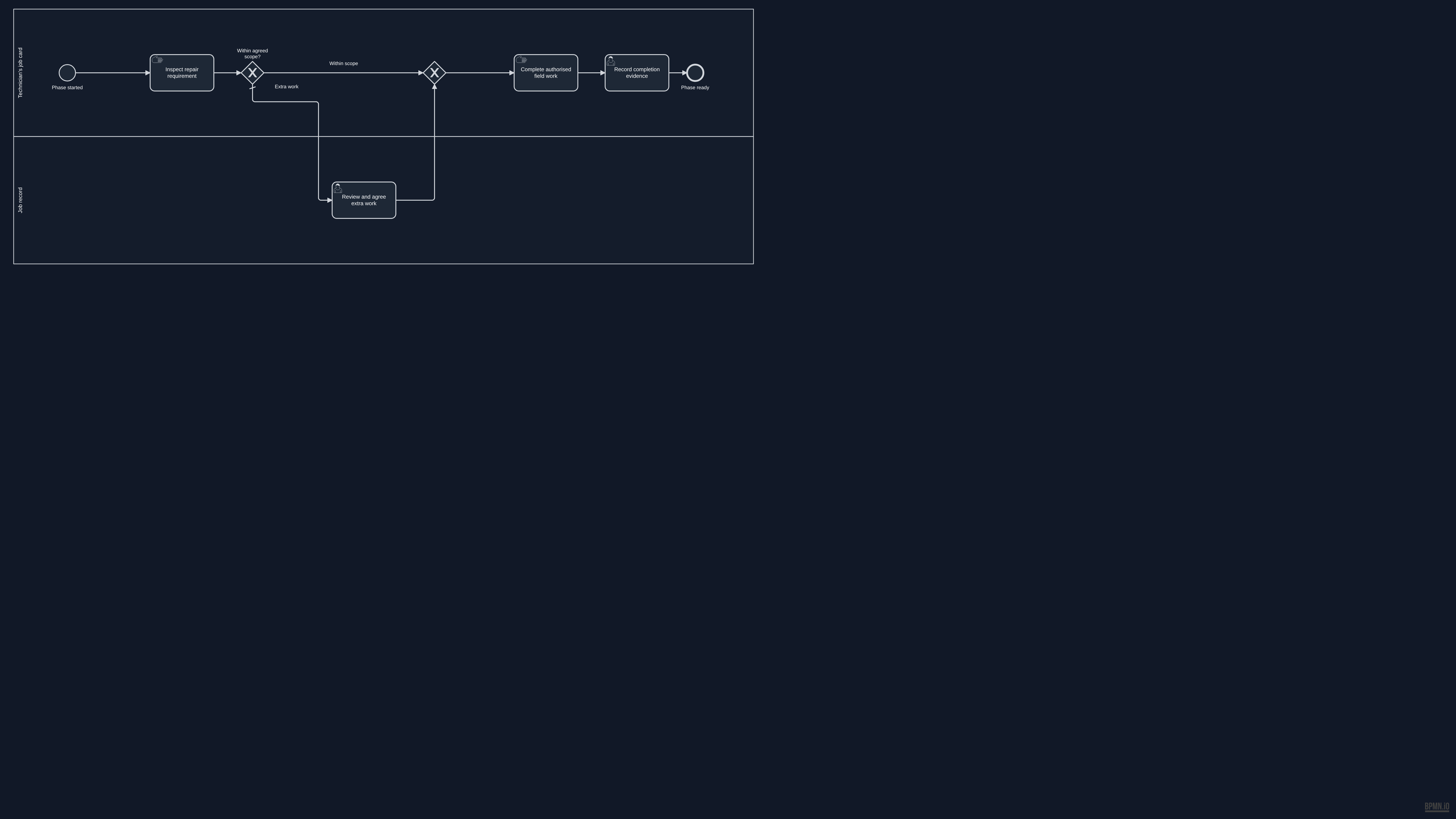
                      Complete authorised repair
                      Detailed BPMN diagram: Complete authorised repair
                      Read this diagram as text

                      Activities and decisions

                      • Phase started (start, Technician’s job card)
                      • Inspect repair requirement (manual task, Technician’s job card)
                      • Within agreed scope? (decision, Technician’s job card)
                      • Review and agree extra work (person's task, Job record)
                      • exclusiveGateway (scope-merge) (decision, Technician’s job card)
                      • Complete authorised field work (manual task, Technician’s job card)
                      • Record completion evidence (person's task, Technician’s job card)
                      • Phase ready (end, Technician’s job card)

                      Connections

                      • Phase started → Inspect repair requirement
                      • Inspect repair requirement → Within agreed scope?
                      • Within agreed scope? → exclusiveGateway (scope-merge): Within scope
                      • Within agreed scope? → Review and agree extra work: Extra work
                      • Review and agree extra work → exclusiveGateway (scope-merge)
                      • exclusiveGateway (scope-merge) → Complete authorised field work
                      • Complete authorised field work → Record completion evidence
                      • Record completion evidence → Phase ready

                      Incoming messages

                        Information used and produced

                          Start with your work

                          Where does the same information get entered again?

                          Tell Peter what is slowing your business down. He will review your message and reply by email to discuss the next step.

                          Tell Peter about your workflow

                          Digital Sanctum knowledge base

                          Search Digital Sanctum

                          Find services, processes, products, case studies, and strategic intelligence in the site index.

                          Type at least two characters to search the knowledge base.