DigitalSanctum.

The Sanctum stack

Different tools.
One clear approach.

Explore the products behind our work. From business operations to AI and infrastructure, each has a clear purpose and a practical way to get started.

Business platforms

Connected business records
  1. Clients
  2. Work
  3. Evidence
Concept illustration. Not a live application or screenshot.

Business operations

Sanctum Core

Connect clients, work and operational records in one business platform.

  • Ticketing and workflow
  • Client and contact records
  • Projects, milestones and tickets

Available as a managed deployment

Explore Sanctum Core
From website to findings
  1. Website
  2. Assessment
  3. Report
Concept illustration. Not a live application or screenshot.

Website assessment

Digital Sanctum Audit

Review website security, performance and search visibility in one structured report.

  • Automated security & compliance scoring
  • SEO and performance audit
  • PDF report generation

Available as a managed deployment

Explore Digital Sanctum Audit
Content with a next step
  1. Create
  2. Publish
  3. Enquiries
Concept illustration. Not a live application or screenshot.

Content operations

Sanctum CMS

Manage website content and incoming leads through a shared publishing workspace.

  • Content management and publishing
  • Built-in lead capture forms
  • Lead pipeline and nurturing

Available as a managed deployment

Explore Sanctum CMS
From form to action
  1. Template
  2. Response
  3. Hand-off
Concept illustration. Not a live application or screenshot.

Form infrastructure

Sanctum Forms

Build reusable forms, collect responses and connect submissions to your operational workflows.

  • Template-to-instance deployment model
  • Embeddable <sanctum-form> web component and hosted /f/:slug pages
  • OIDC-gated respondent flows with public, optional, and required modes

Available as a managed deployment

Explore Sanctum Forms
Make the process visible
  1. Model
  2. Execute
  3. Review
Concept illustration. Not a live application or screenshot.

Process orchestration

Sanctum Flow

Model business processes and follow their execution with a traceable record of progress.

  • BPMN visual process editor (bpmn-js)
  • Step-based execution engine with lifecycle tracking
  • Append-only audit event log

Available as a managed deployment

Explore Sanctum Flow
Explore before you build
  1. Compose
  2. Preview
  3. Annotate
Concept illustration. Not a live application or screenshot.

Design collaboration

Sanctum Mock

Create interface mockups, preview ideas and collect feedback before implementation.

  • Rich text/code/JSON/JSX sandbox editors
  • HTML + CSS preview with live rendering
  • Image mockup upload with annotation

Available as a managed deployment

Explore Sanctum Mock
Manage the instance lifecycle
  1. Provision
  2. Manage
  3. Monitor
Concept illustration. Not a live application or screenshot.

Instance management

Sanctum Hive

Provision and manage Sanctum CMS instances through a shared administration interface.

  • One-click CMS instance provisioning
  • DNS, Apache vhost, and SSL cert management
  • Instance health monitoring and log viewer

Available as a managed deployment

Explore Sanctum Hive

Specialist tools

Patterns that fit your interface
  1. Pattern
  2. Theme
  3. Render
Concept illustration. Not a live application or screenshot.

Visual components

Sanctum Visual

Add scalable, theme-aware SVG background patterns with a reusable web component.

  • Scalable SVG background patterns
  • Configurable colours and aspect ratio
  • Reusable custom element

Internal tool · adaptable for client work

Explore Sanctum Visual
A useful digital front door
  1. Discover
  2. Explore
  3. Connect
Concept illustration. Not a live application or screenshot.

Digital presence

Digital Sanctum Website

Connect services, products and practical insights in a searchable business website.

  • Data-driven service landing pages
  • Blog series/cluster SEO architecture
  • Pagefind static search integration

Internal tool · adaptable for client work

Explore Digital Sanctum Website
Credentials with context
  1. Store
  2. Organise
  3. Access
Concept illustration. Not a live application or screenshot.

Credential management

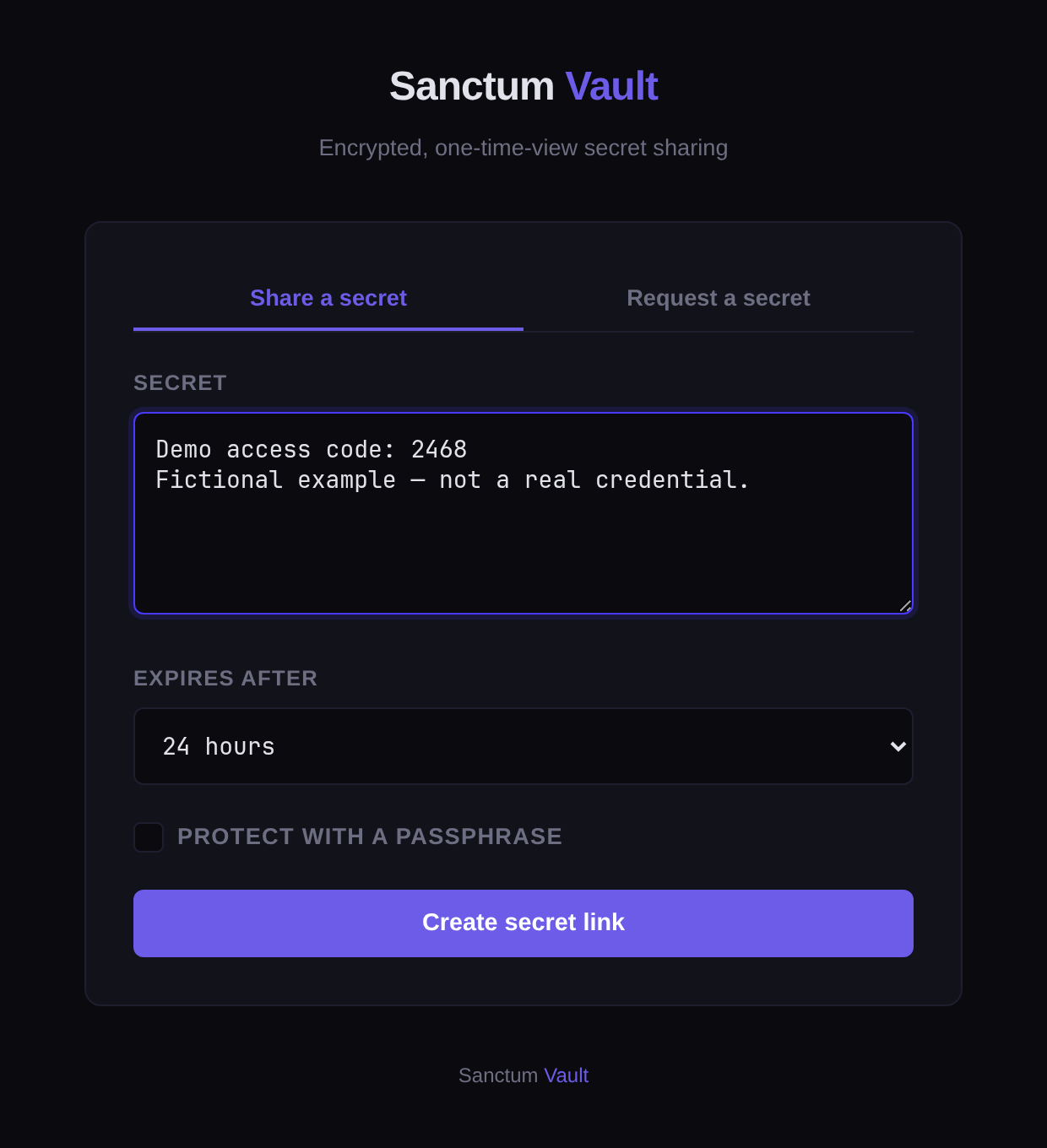
Sanctum Vault

Organise credentials and secrets used by infrastructure, applications and service accounts.

  • Encrypted credential storage
  • API key and secret management
  • Service account provisioning

Internal tool · adaptable for client work

Explore Sanctum Vault
Turn checks into visibility
  1. Observe
  2. Status
  3. Follow-up
Concept illustration. Not a live application or screenshot.

Service visibility

Sanctum Monitor

Bring service availability, status and incidents into a shared monitoring view.

  • Real-time uptime monitoring
  • Multi-service status dashboard
  • Alert and incident tracking

Internal tool · adaptable for client work

Explore Sanctum Monitor
A shared route to models
  1. Application
  2. Router
  3. Provider
Concept illustration. Not a live application or screenshot.

AI infrastructure

Sanctum Router

Connect applications to configured AI model providers through a shared API.

  • Multi-provider model routing
  • Shared routing API
  • Model catalogue

Internal tool · adaptable for client work

Explore Sanctum Router
From objective to delivery
  1. Delegate
  2. Coordinate
  3. Review
Concept illustration. Not a live application or screenshot.

AI workforce

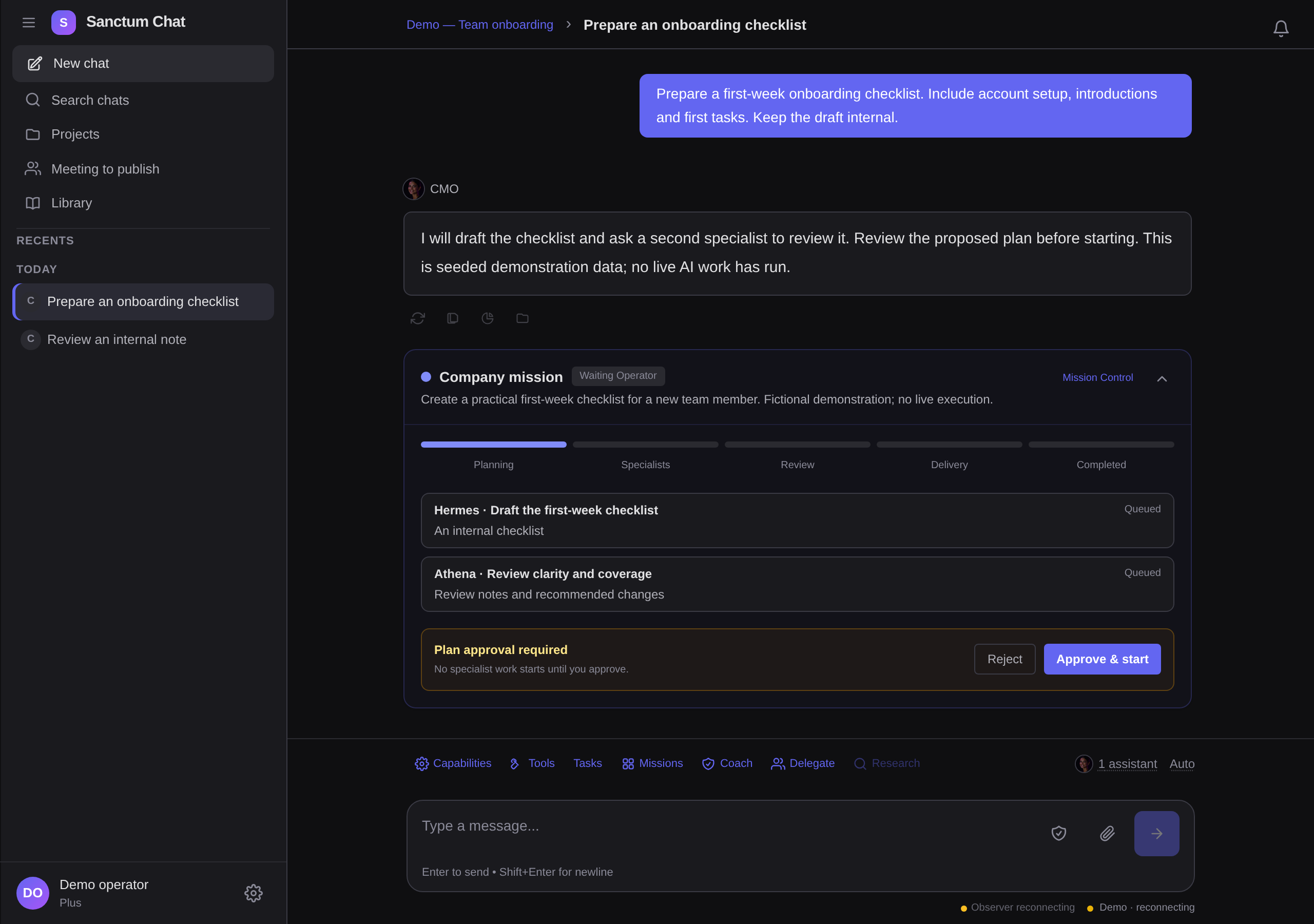
Sanctum Chat

Delegate outcomes to an AI workforce with plan approval, progress visibility and review.

  • Outcome delegation to accountable AI leads
  • Plan approval before specialist execution
  • Mission Control for progress, budgets, and interventions

Internal tool · adaptable for client work

Explore Sanctum Chat
Give good work a structure
  1. Preconditions
  2. Decision gates
  3. Evidence checks
Concept illustration. Not a live application or screenshot.

Structured knowledge

Sanctum Compose

Turn operational knowledge into structured compositions and selected public snapshots.

  • Six typed knowledge primitives
  • Editable source and snapshot boundary
  • Snapshot integrity metadata

Available for guided implementation

Explore Sanctum Compose
From event to email
  1. Business event
  2. Sanctum Notify
  3. Email provider
Concept illustration. Not a live application or screenshot.

Operational email

Sanctum Notify

Turn business events into useful emails, with a traceable dispatch record.

  • Reusable email templates
  • Configured provider fallback
  • Dispatch and retry history

Available for guided integration

Explore Sanctum Notify

Research and development

Knowledge in context
  1. Documents
  2. Retrieval
  3. Response
Concept illustration. Not a live application or screenshot.

Research prototype

Sovereign AI Agent

Explore retrieval over internal documentation with a privately deployed knowledge assistant.

  • Private RAG over internal documentation
  • On-premise deployment (no data leakage)
  • MCP tool integration with Sanctum Core

Research prototype

Explore Sovereign AI Agent

Start with the work

Find the right fit.
Then build it properly.

Tell us what your team needs to achieve. We’ll work through the products, integrations and support that make sense for you.

Start a conversation ↗

Digital Sanctum knowledge base

Search Digital Sanctum

Find services, processes, products, case studies, and strategic intelligence. Search stays in your browser.

Type at least two characters to search the knowledge base.