DigitalSanctum.
Menu
Process Library

Illustrative process

Wholesale: a customer purchase order

An existing customer emails a purchase order for several products, with item codes, quantities, a delivery address and their order reference.

Reuse checked order lines and delivery details from sales through fulfilment and invoicing. Keep stock and dispatch decisions visible.

Same request, same business systems

See what could change.

These models illustrate possible ways of working. They are not a client result, a live integration or an executable workflow. What works for your business depends on your tools, permissions and the checks you need.

Before

Manual handoffs

The same request is read, copied or passed between people and systems.

  1. 1. Customer-order inbox

    Read the purchase order and find the customer, items and delivery details.

  2. 2. Sales order

    Re-enter the customer, item codes, quantities and prices.

  3. 3. Stock and pick list

    Check stock separately and write or copy a picking list.

  4. 4. Courier booking

    Retype the delivery address and package details into the courier system.

  5. 5. Accounting invoice

    Re-enter the approved order lines and customer reference for billing.
Possible improvement

Connected handoffs

Customer-order inbox and Sales order. Keep the original request and check the shared record. Check the customer, item codes, quantities and agreed prices once.

Independent work can happen in parallel

Stock and pick list

Check stock and prepare picking

Use the checked order lines. Resolve shortages before fulfilment.

Accounting invoice

Prepare invoice details

Reuse the approved order lines and customer reference. Keep it as a draft.

Stock confirmed. Order packed. Billing reviewed. Dispatch waits for picking, packing and billing review.

Courier booking: Confirm dispatch. Pass the checked address and final package details to the courier booking when ready.

Ready to dispatch, with the order and paperwork linked.

A person still makes the decisions. Unknown item codes, stock shortages, changed prices or unclear delivery instructions need a person’s decision.

Flow reference diagrams

Explore the process.

Open a full-size diagram to inspect it. The original Flow definitions remain unpublished drafts. These reference snapshots do not run a process.

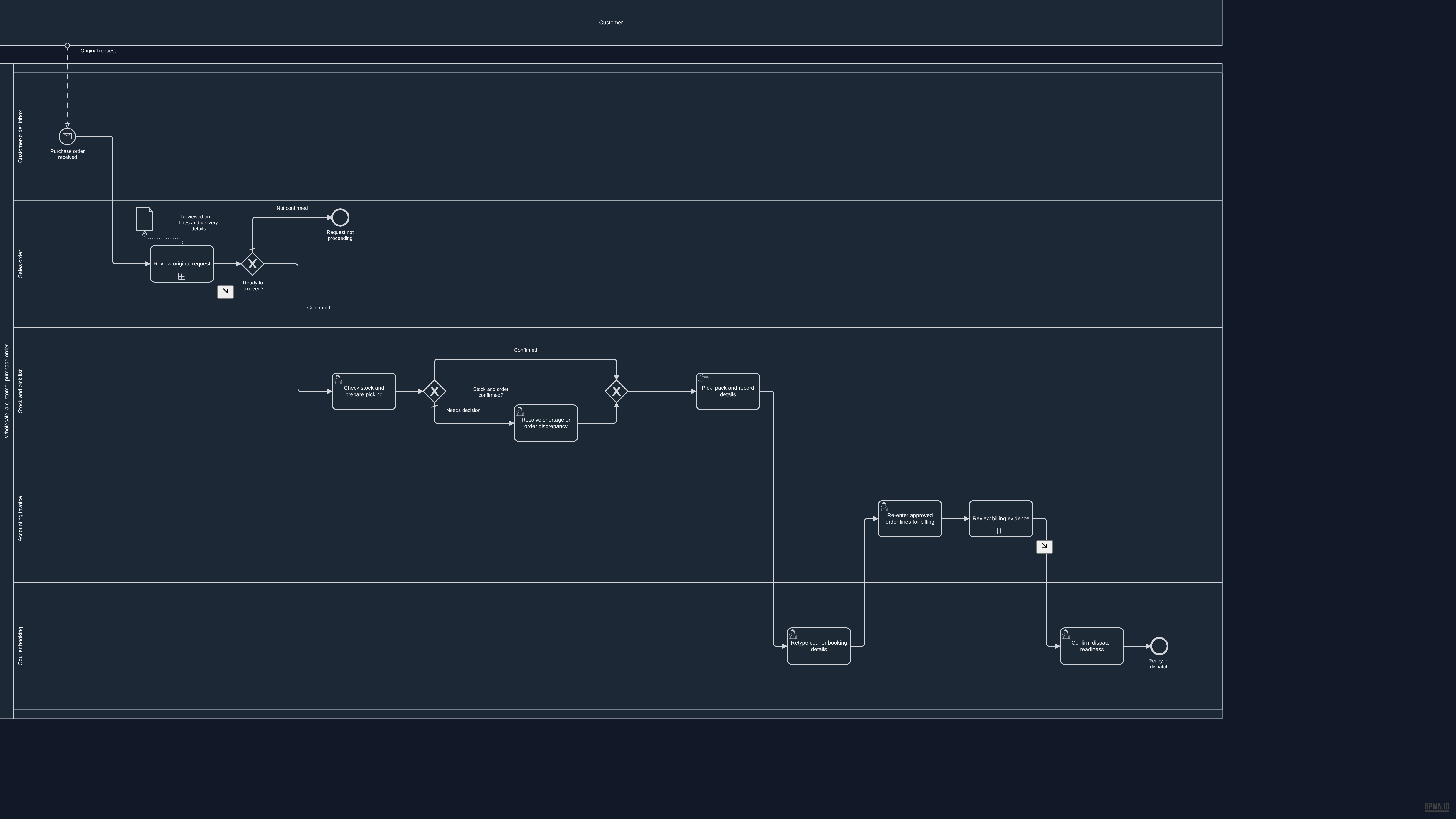
Before

Manual handoffs

Overview BPMN diagram for Manual handoffs. The process summary above describes this example.

Open the full-size overview · Download this BPMN draft snapshot

Source and validation details

This reference was prepared from approved unpublished draft 77cdc330-633e-4a92-93b5-74393310f1cc. The source remains a draft and is not ready for native publication.

Source BPMN SHA-256
ba327e7088564e4b1481b2d477889793d8041ec1a51377b07c5482afdadc9183
Reference BPMN SHA-256
667ea67c5c180425f4c76c1b3c63a68ac4014220e3f7b36b5365111c7518e562

The reference removes historical review metadata from the source documentation. The process and diagram layout are unchanged. Native validation recorded the following warnings:

  • G-40: Step 'stock-rework' has a name of 37 characters : may truncate in BPMN shape rendering
  • G-40: Step 'invoice' has a name of 41 characters : may truncate in BPMN shape rendering
  • QUALITY_GATE_04: Error / Exception Paths: Zero boundary events : no error paths
  • QUALITY_GATE_06: Visual Legibility: 1 step names exceed 40 chars and may overflow task rectangles
  • QUALITY_GATE_08: SLA & Timing Metadata: No SLA targets set on any step
Read this diagram as text

Activities and decisions

  • Purchase order received (start, Customer-order inbox)
  • Request not proceeding (end, Sales order)
  • Check stock and prepare picking (person's task, Stock and pick list)
  • Stock and order confirmed? (decision, Stock and pick list)
  • Resolve shortage or order discrepancy (person's task, Stock and pick list)
  • exclusiveGateway (stock-merge) (decision, Stock and pick list)
  • Pick, pack and record details (manual task, Stock and pick list)
  • Re-enter approved order lines for billing (person's task, Accounting invoice)
  • Retype courier booking details (person's task, Courier booking)
  • Confirm dispatch readiness (person's task, Courier booking)
  • Ready for dispatch (end, Courier booking)
  • Review original request (detailed phase, Sales order)
  • Ready to proceed? (decision, Sales order)
  • Review billing evidence (detailed phase, Accounting invoice)
  • Reviewed order lines and delivery details (information)

Connections

  • Purchase order received → Review original request
  • Check stock and prepare picking → Stock and order confirmed?
  • Stock and order confirmed? → exclusiveGateway (stock-merge): Confirmed
  • Stock and order confirmed? → Resolve shortage or order discrepancy: Needs decision
  • Resolve shortage or order discrepancy → exclusiveGateway (stock-merge)
  • exclusiveGateway (stock-merge) → Pick, pack and record details
  • Pick, pack and record details → Retype courier booking details
  • Re-enter approved order lines for billing → Review billing evidence
  • Retype courier booking details → Re-enter approved order lines for billing
  • Confirm dispatch readiness → Ready for dispatch
  • Review original request → Ready to proceed?
  • Ready to proceed? → Request not proceeding: Not confirmed
  • Ready to proceed? → Check stock and prepare picking: Confirmed
  • Review billing evidence → Confirm dispatch readiness

Incoming messages

  • Customer → Purchase order received: Original request

Information used and produced

  • Review original request creates Reviewed order lines and delivery details
View detailed process diagrams
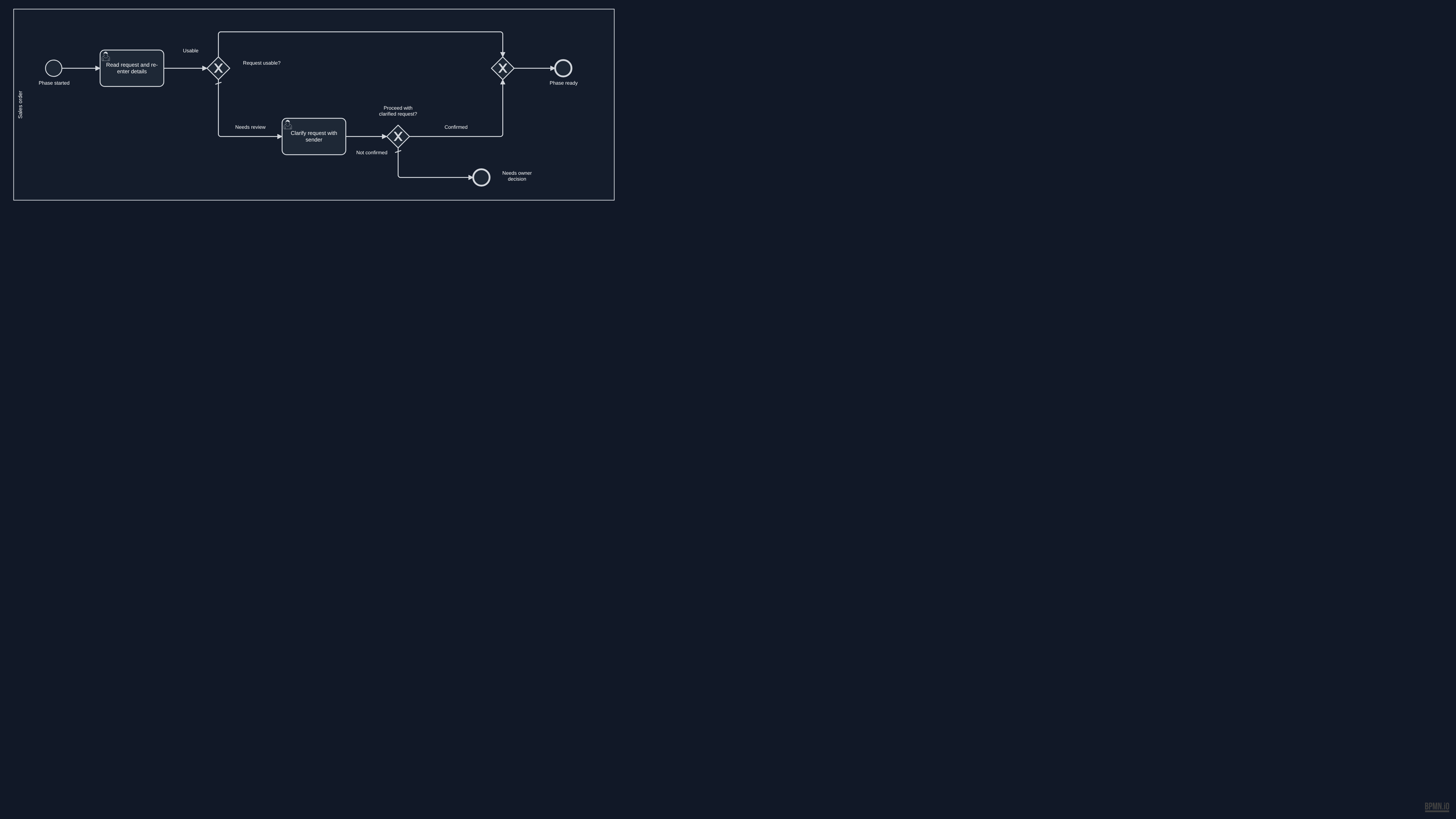
Review original request
Detailed BPMN diagram: Review original request
Read this diagram as text

Activities and decisions

  • Phase started (start, Sales order)
  • Read request and re-enter details (person's task, Sales order)
  • Request usable? (decision, Sales order)
  • Clarify request with sender (person's task, Sales order)
  • Proceed with clarified request? (decision, Sales order)
  • exclusiveGateway (request-ready) (decision, Sales order)
  • Needs owner decision (end, Sales order)
  • Phase ready (end, Sales order)

Connections

  • Phase started → Read request and re-enter details
  • Read request and re-enter details → Request usable?
  • Request usable? → exclusiveGateway (request-ready): Usable
  • Request usable? → Clarify request with sender: Needs review
  • Clarify request with sender → Proceed with clarified request?
  • Proceed with clarified request? → exclusiveGateway (request-ready): Confirmed
  • Proceed with clarified request? → Needs owner decision: Not confirmed
  • exclusiveGateway (request-ready) → Phase ready

Incoming messages

    Information used and produced

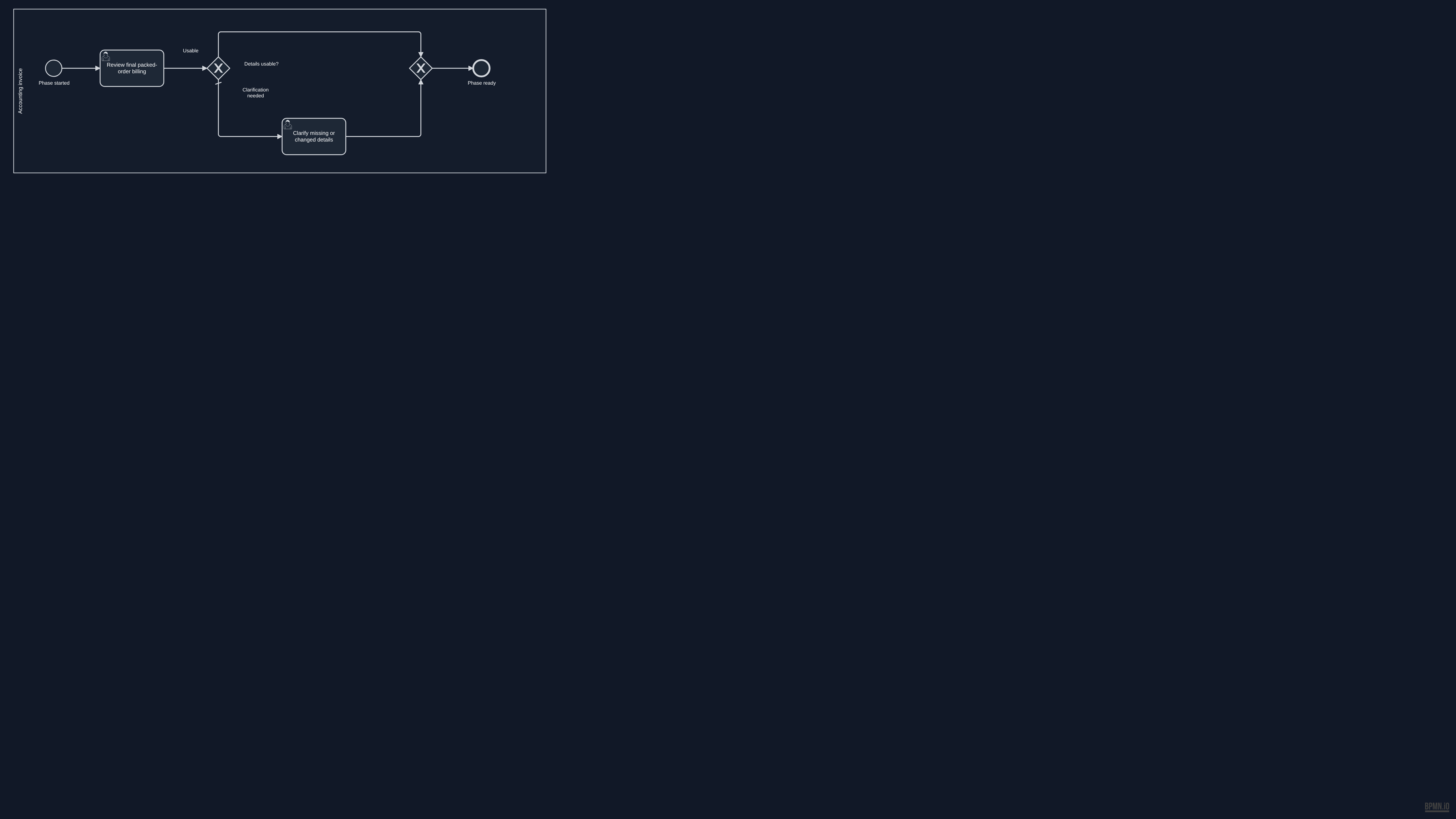
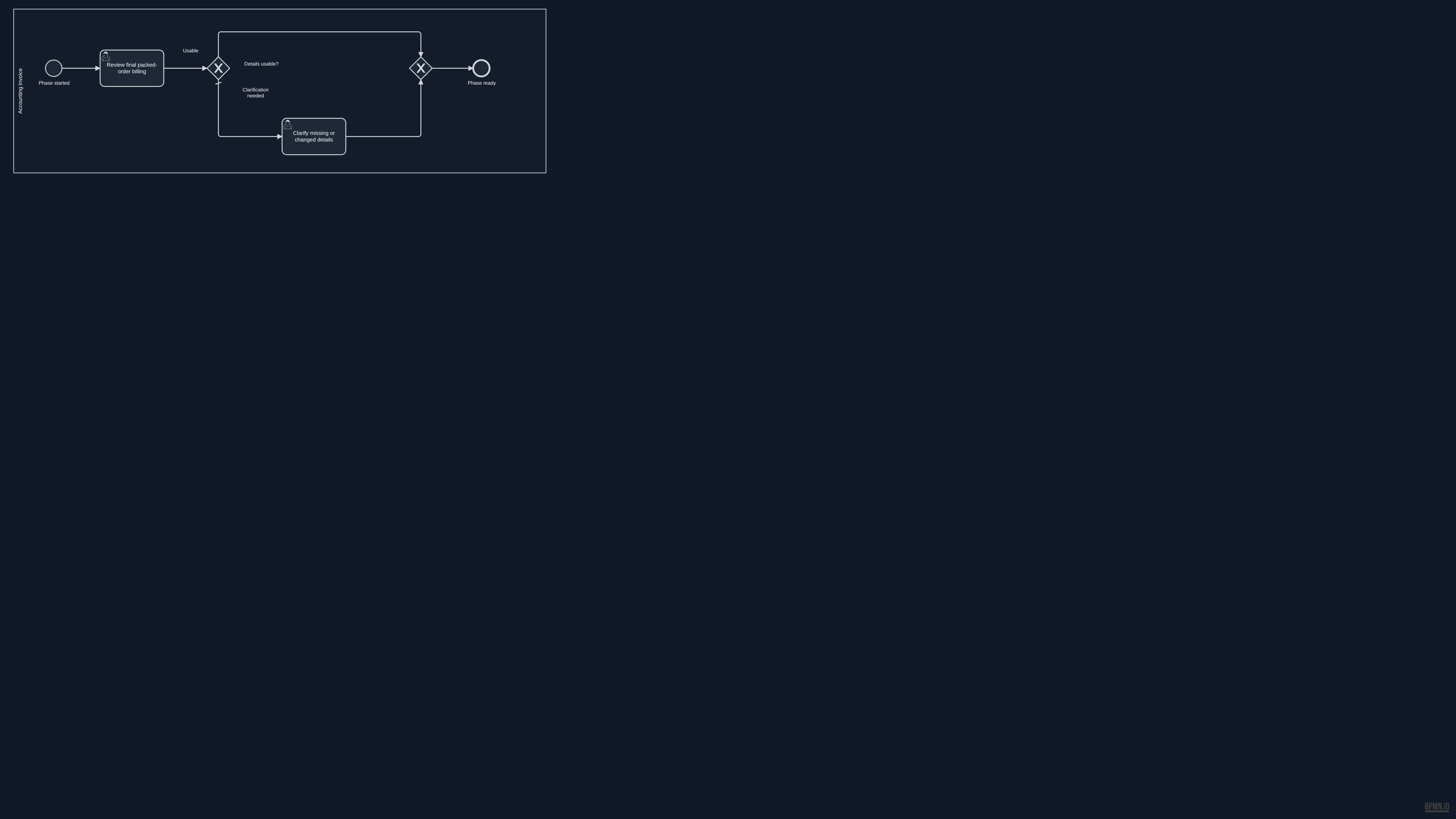
      Review billing evidence
      Detailed BPMN diagram: Review billing evidence
      Read this diagram as text

      Activities and decisions

      • Phase started (start, Accounting invoice)
      • Review final packed-order billing (person's task, Accounting invoice)
      • Details usable? (decision, Accounting invoice)
      • Clarify missing or changed details (person's task, Accounting invoice)
      • exclusiveGateway (billing-review-merge) (decision, Accounting invoice)
      • Phase ready (end, Accounting invoice)

      Connections

      • Phase started → Review final packed-order billing
      • Review final packed-order billing → Details usable?
      • Details usable? → exclusiveGateway (billing-review-merge): Usable
      • Details usable? → Clarify missing or changed details: Clarification needed
      • Clarify missing or changed details → exclusiveGateway (billing-review-merge)
      • exclusiveGateway (billing-review-merge) → Phase ready

      Incoming messages

        Information used and produced

          Possible improvement

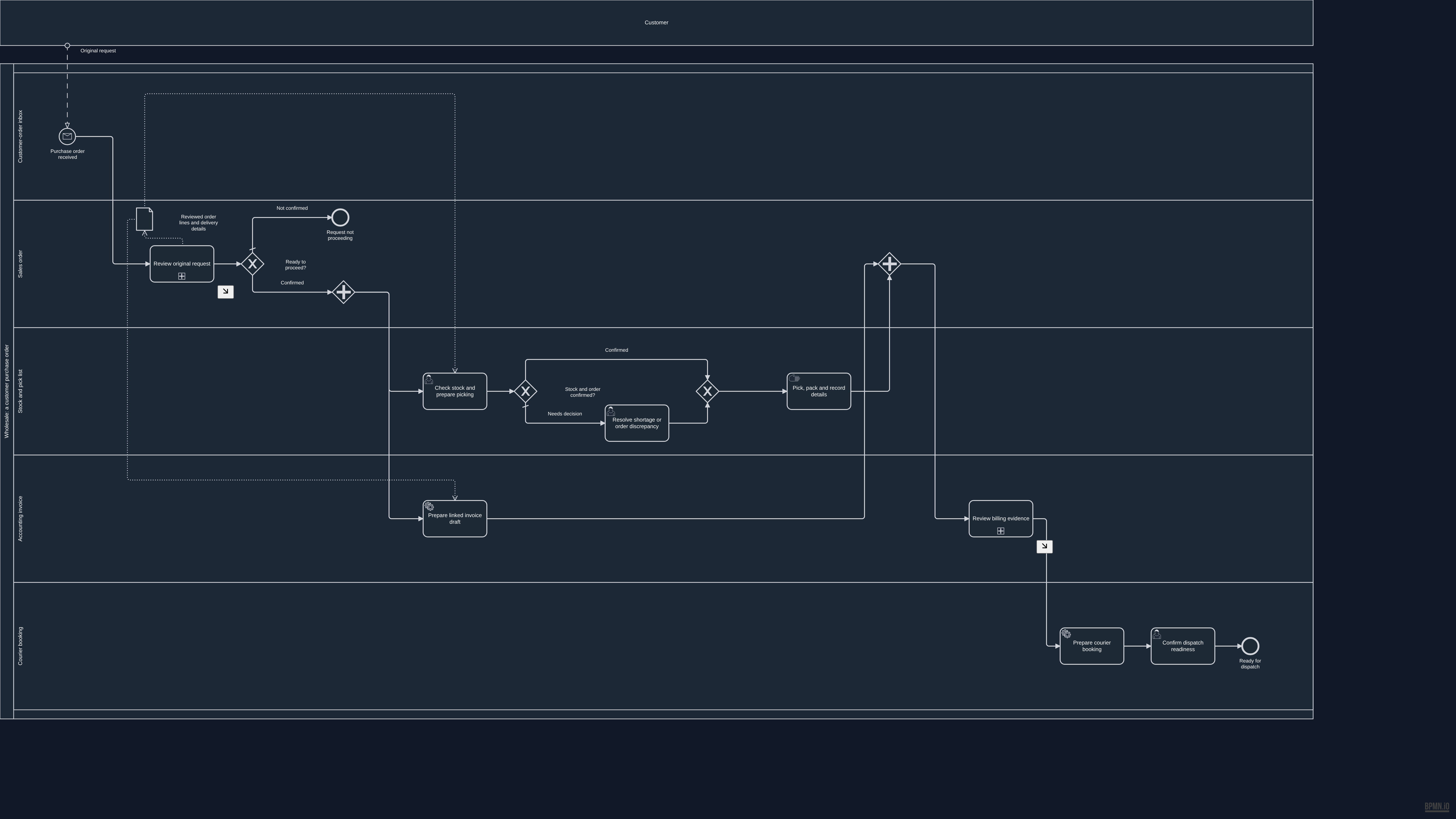
          Connected handoffs

          Overview BPMN diagram for Connected handoffs. The process summary above describes this example.

          Open the full-size overview · Download this BPMN draft snapshot

          Source and validation details

          This reference was prepared from approved unpublished draft 0dcca3d9-2dba-4de5-9b8a-6ccecad87f45. The source remains a draft and is not ready for native publication.

          Source BPMN SHA-256
          dde0976f12df31686e5b5ec6d39cc70023a4f83f84023cd7284a009af86721dd
          Reference BPMN SHA-256
          aa2be65a6c9092ad15d88d9b62510c103a02297e2ea7c9ef199c050951e3782a

          The reference removes historical review metadata from the source documentation. The process and diagram layout are unchanged. Native validation recorded the following warnings:

          • G-40: Step 'stock-rework' has a name of 37 characters : may truncate in BPMN shape rendering
          • QUALITY_GATE_04: Error / Exception Paths: Zero boundary events : no error paths
          • QUALITY_GATE_08: SLA & Timing Metadata: No SLA targets set on any step
          • QUALITY_GATE_09: Edge Routing & Label Clarity: 4/6 gateway edges have labels
          • QUALITY_GATE_12: Edge Routing Quality / Waypoint Sanity: 'Prepare linked invoice draft' -> '' crosses 2 lane boundaries (lane 'Accounting invoice' -> 'Sales order'); '' -> 'Prepare linked invoice draft' crosses 2 lane boundaries (lane 'Sales order' -> 'Accounting invoice'); '' -> 'Review billing evidence' crosses 2 lane boundaries (lane 'Sales order' -> 'Accounting invoice')
          Read this diagram as text

          Activities and decisions

          • Purchase order received (start, Customer-order inbox)
          • Request not proceeding (end, Sales order)
          • Check stock and prepare picking (person's task, Stock and pick list)
          • Stock and order confirmed? (decision, Stock and pick list)
          • Resolve shortage or order discrepancy (person's task, Stock and pick list)
          • exclusiveGateway (stock-merge) (decision, Stock and pick list)
          • Pick, pack and record details (manual task, Stock and pick list)
          • Prepare linked invoice draft (proposed system task, Accounting invoice)
          • Prepare courier booking (proposed system task, Courier booking)
          • parallelGateway (prepare-fork) (parallel split or join, Sales order)
          • parallelGateway (prepare-join) (parallel split or join, Sales order)
          • Confirm dispatch readiness (person's task, Courier booking)
          • Ready for dispatch (end, Courier booking)
          • Review original request (detailed phase, Sales order)
          • Ready to proceed? (decision, Sales order)
          • Review billing evidence (detailed phase, Accounting invoice)
          • Reviewed order lines and delivery details (information)

          Connections

          • Purchase order received → Review original request
          • Check stock and prepare picking → Stock and order confirmed?
          • Stock and order confirmed? → exclusiveGateway (stock-merge): Confirmed
          • Stock and order confirmed? → Resolve shortage or order discrepancy: Needs decision
          • Resolve shortage or order discrepancy → exclusiveGateway (stock-merge)
          • exclusiveGateway (stock-merge) → Pick, pack and record details
          • Pick, pack and record details → parallelGateway (prepare-join)
          • Prepare linked invoice draft → parallelGateway (prepare-join)
          • Prepare courier booking → Confirm dispatch readiness
          • parallelGateway (prepare-fork) → Check stock and prepare picking
          • parallelGateway (prepare-fork) → Prepare linked invoice draft
          • parallelGateway (prepare-join) → Review billing evidence
          • Confirm dispatch readiness → Ready for dispatch
          • Review original request → Ready to proceed?
          • Ready to proceed? → Request not proceeding: Not confirmed
          • Ready to proceed? → parallelGateway (prepare-fork): Confirmed
          • Review billing evidence → Prepare courier booking

          Incoming messages

          • Customer → Purchase order received: Original request

          Information used and produced

          • Check stock and prepare picking uses Reviewed order lines and delivery details
          • Prepare linked invoice draft uses Reviewed order lines and delivery details
          • Review original request creates Reviewed order lines and delivery details
          View detailed process diagrams
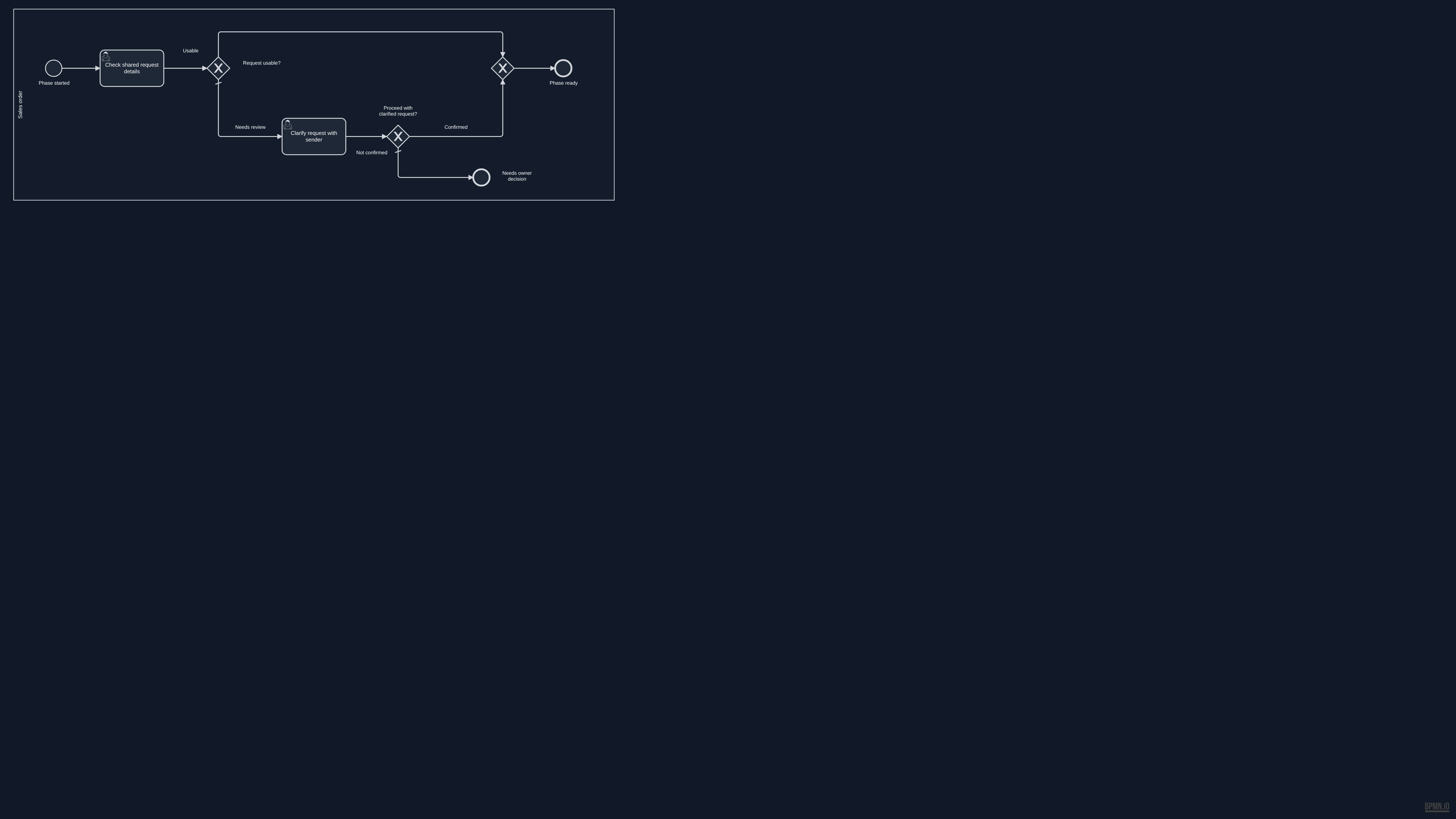
          Review original request
          Detailed BPMN diagram: Review original request
          Read this diagram as text

          Activities and decisions

          • Phase started (start, Sales order)
          • Check shared request details (person's task, Sales order)
          • Request usable? (decision, Sales order)
          • Clarify request with sender (person's task, Sales order)
          • Proceed with clarified request? (decision, Sales order)
          • exclusiveGateway (request-ready) (decision, Sales order)
          • Needs owner decision (end, Sales order)
          • Phase ready (end, Sales order)

          Connections

          • Phase started → Check shared request details
          • Check shared request details → Request usable?
          • Request usable? → exclusiveGateway (request-ready): Usable
          • Request usable? → Clarify request with sender: Needs review
          • Clarify request with sender → Proceed with clarified request?
          • Proceed with clarified request? → exclusiveGateway (request-ready): Confirmed
          • Proceed with clarified request? → Needs owner decision: Not confirmed
          • exclusiveGateway (request-ready) → Phase ready

          Incoming messages

            Information used and produced

              Review billing evidence
              Detailed BPMN diagram: Review billing evidence
              Read this diagram as text

              Activities and decisions

              • Phase started (start, Accounting invoice)
              • Review final packed-order billing (person's task, Accounting invoice)
              • Details usable? (decision, Accounting invoice)
              • Clarify missing or changed details (person's task, Accounting invoice)
              • exclusiveGateway (billing-review-merge) (decision, Accounting invoice)
              • Phase ready (end, Accounting invoice)

              Connections

              • Phase started → Review final packed-order billing
              • Review final packed-order billing → Details usable?
              • Details usable? → exclusiveGateway (billing-review-merge): Usable
              • Details usable? → Clarify missing or changed details: Clarification needed
              • Clarify missing or changed details → exclusiveGateway (billing-review-merge)
              • exclusiveGateway (billing-review-merge) → Phase ready

              Incoming messages

                Information used and produced

                  Start with your work

                  Where does the same information get entered again?

                  Tell Peter what is slowing your business down. He will review your message and reply by email to discuss the next step.

                  Tell Peter about your workflow

                  Digital Sanctum knowledge base

                  Search Digital Sanctum

                  Find services, processes, products, case studies, and strategic intelligence in the site index.

                  Type at least two characters to search the knowledge base.