DigitalSanctum.
Menu
Process Library

Illustrative process

Accounting: onboarding a new business client

A prospective bookkeeping client submits an intake form with their business name, contact details, existing software and the services they want to discuss.

Reuse the agreed business and contact details while preparing the engagement, document requests and onboarding work.

Same request, same business systems

See what could change.

These models illustrate possible ways of working. They are not a client result, a live integration or an executable workflow. What works for your business depends on your tools, permissions and the checks you need.

Before

Manual handoffs

The same request is read, copied or passed between people and systems.

  1. 1. Client-intake form

    Read the submission and follow up any missing business details.

  2. 2. Practice client record

    Re-enter the business and contact details into the practice system.

  3. 3. Engagement letter

    Copy details into a letter and assemble the proposed services.

  4. 4. Document workspace

    Create a folder, prepare a document list and send separate requests.

  5. 5. Onboarding task board

    Copy the agreed work into tasks, assign people and chase missing items.
Possible improvement

Connected handoffs

Client-intake form and Practice client record. Keep the original request and check the shared record. Check the business, contact details and requested services once.

Engagement letter: Agree the engagement. Prepare the letter from checked details. A person reviews the services and agrees the scope.

Independent work can happen in parallel

Document workspace

Prepare document requests

Create the workspace and checklist for the agreed services.

Onboarding task board

Prepare onboarding tasks

Create linked tasks and assign the agreed work from the same scope.

Documents and permissions checked. A person follows up missing information and confirms access before dependent work begins.

Onboarding prepared, with requests and work kept together.

A person still makes the decisions. Unclear services, incomplete details, missing permissions or a changed scope stay with the practice for review.

Flow reference diagrams

Explore the process.

Open a full-size diagram to inspect it. The original Flow definitions remain unpublished drafts. These reference snapshots do not run a process.

Before

Manual handoffs

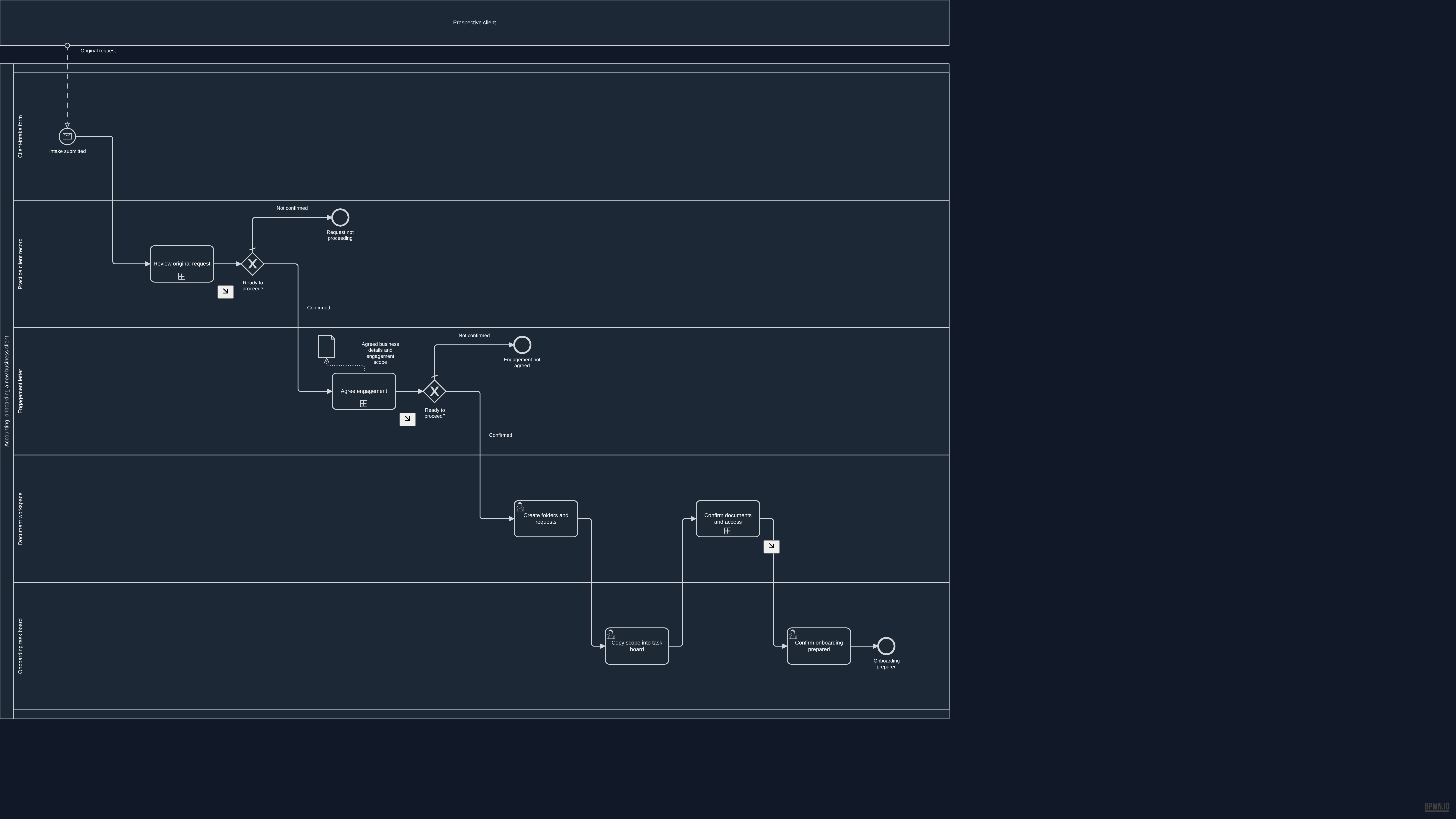
Overview BPMN diagram for Manual handoffs. The process summary above describes this example.

Open the full-size overview · Download this BPMN draft snapshot

Source and validation details

This reference was prepared from approved unpublished draft b235a665-5a68-4a49-b1fd-d064fd5feec2. The source remains a draft and is not ready for native publication.

Source BPMN SHA-256
0881109b7b72bb37d9c1ccb33df6ae98b79975172190677c0225aa9dab00e944
Reference BPMN SHA-256
d2ab2443356225824e44bafd9793b905dc976b7bc44039831cd7e024918a7013

The reference removes historical review metadata from the source documentation. The process and diagram layout are unchanged. Native validation recorded the following warnings:

  • QUALITY_GATE_04: Error / Exception Paths: Zero boundary events : no error paths
  • QUALITY_GATE_08: SLA & Timing Metadata: No SLA targets set on any step
Read this diagram as text

Activities and decisions

  • Intake submitted (start, Client-intake form)
  • Request not proceeding (end, Practice client record)
  • Engagement not agreed (end, Engagement letter)
  • Create folders and requests (person's task, Document workspace)
  • Copy scope into task board (person's task, Onboarding task board)
  • Confirm onboarding prepared (person's task, Onboarding task board)
  • Onboarding prepared (end, Onboarding task board)
  • Review original request (detailed phase, Practice client record)
  • Ready to proceed? (decision, Practice client record)
  • Agree engagement (detailed phase, Engagement letter)
  • Ready to proceed? (decision, Engagement letter)
  • Confirm documents and access (detailed phase, Document workspace)
  • Agreed business details and engagement scope (information)

Connections

  • Intake submitted → Review original request
  • Create folders and requests → Copy scope into task board
  • Copy scope into task board → Confirm documents and access
  • Confirm onboarding prepared → Onboarding prepared
  • Review original request → Ready to proceed?
  • Ready to proceed? → Request not proceeding: Not confirmed
  • Ready to proceed? → Agree engagement: Confirmed
  • Agree engagement → Ready to proceed?
  • Ready to proceed? → Engagement not agreed: Not confirmed
  • Ready to proceed? → Create folders and requests: Confirmed
  • Confirm documents and access → Confirm onboarding prepared

Incoming messages

  • Prospective client → Intake submitted: Original request

Information used and produced

  • Agree engagement creates Agreed business details and engagement scope
View detailed process diagrams
Review original request
Detailed BPMN diagram: Review original request
Read this diagram as text

Activities and decisions

  • Phase started (start, Practice client record)
  • Read request and re-enter details (person's task, Practice client record)
  • Request usable? (decision, Practice client record)
  • Clarify request with sender (person's task, Practice client record)
  • Proceed with clarified request? (decision, Practice client record)
  • exclusiveGateway (request-ready) (decision, Practice client record)
  • Needs owner decision (end, Practice client record)
  • Phase ready (end, Practice client record)

Connections

  • Phase started → Read request and re-enter details
  • Read request and re-enter details → Request usable?
  • Request usable? → exclusiveGateway (request-ready): Usable
  • Request usable? → Clarify request with sender: Needs review
  • Clarify request with sender → Proceed with clarified request?
  • Proceed with clarified request? → exclusiveGateway (request-ready): Confirmed
  • Proceed with clarified request? → Needs owner decision: Not confirmed
  • exclusiveGateway (request-ready) → Phase ready

Incoming messages

    Information used and produced

      Agree engagement
      Detailed BPMN diagram: Agree engagement
      Read this diagram as text

      Activities and decisions

      • Phase started (start, Engagement letter)
      • Prepare engagement letter (person's task, Engagement letter)
      • Agree engagement scope (person's task, Engagement letter)
      • Engagement agreed? (decision, Engagement letter)
      • Clarify services and proposed scope (person's task, Engagement letter)
      • Agreement now confirmed? (decision, Engagement letter)
      • exclusiveGateway (agreement-merge) (decision, Engagement letter)
      • Needs owner decision (end, Engagement letter)
      • Phase ready (end, Engagement letter)

      Connections

      • Phase started → Prepare engagement letter
      • Prepare engagement letter → Agree engagement scope
      • Agree engagement scope → Engagement agreed?
      • Engagement agreed? → exclusiveGateway (agreement-merge): Agreed
      • Engagement agreed? → Clarify services and proposed scope: Needs clarification
      • Clarify services and proposed scope → Agreement now confirmed?
      • Agreement now confirmed? → exclusiveGateway (agreement-merge): Confirmed
      • Agreement now confirmed? → Needs owner decision: Not confirmed
      • exclusiveGateway (agreement-merge) → Phase ready

      Incoming messages

        Information used and produced

          Confirm documents and access
          Detailed BPMN diagram: Confirm documents and access
          Read this diagram as text

          Activities and decisions

          • Phase started (start, Document workspace)
          • Check documents and permissions (person's task, Document workspace)
          • Details usable? (decision, Document workspace)
          • Clarify missing or changed details (person's task, Document workspace)
          • exclusiveGateway (access-review-merge) (decision, Document workspace)
          • Phase ready (end, Document workspace)

          Connections

          • Phase started → Check documents and permissions
          • Check documents and permissions → Details usable?
          • Details usable? → exclusiveGateway (access-review-merge): Usable
          • Details usable? → Clarify missing or changed details: Clarification needed
          • Clarify missing or changed details → exclusiveGateway (access-review-merge)
          • exclusiveGateway (access-review-merge) → Phase ready

          Incoming messages

            Information used and produced

              Possible improvement

              Connected handoffs

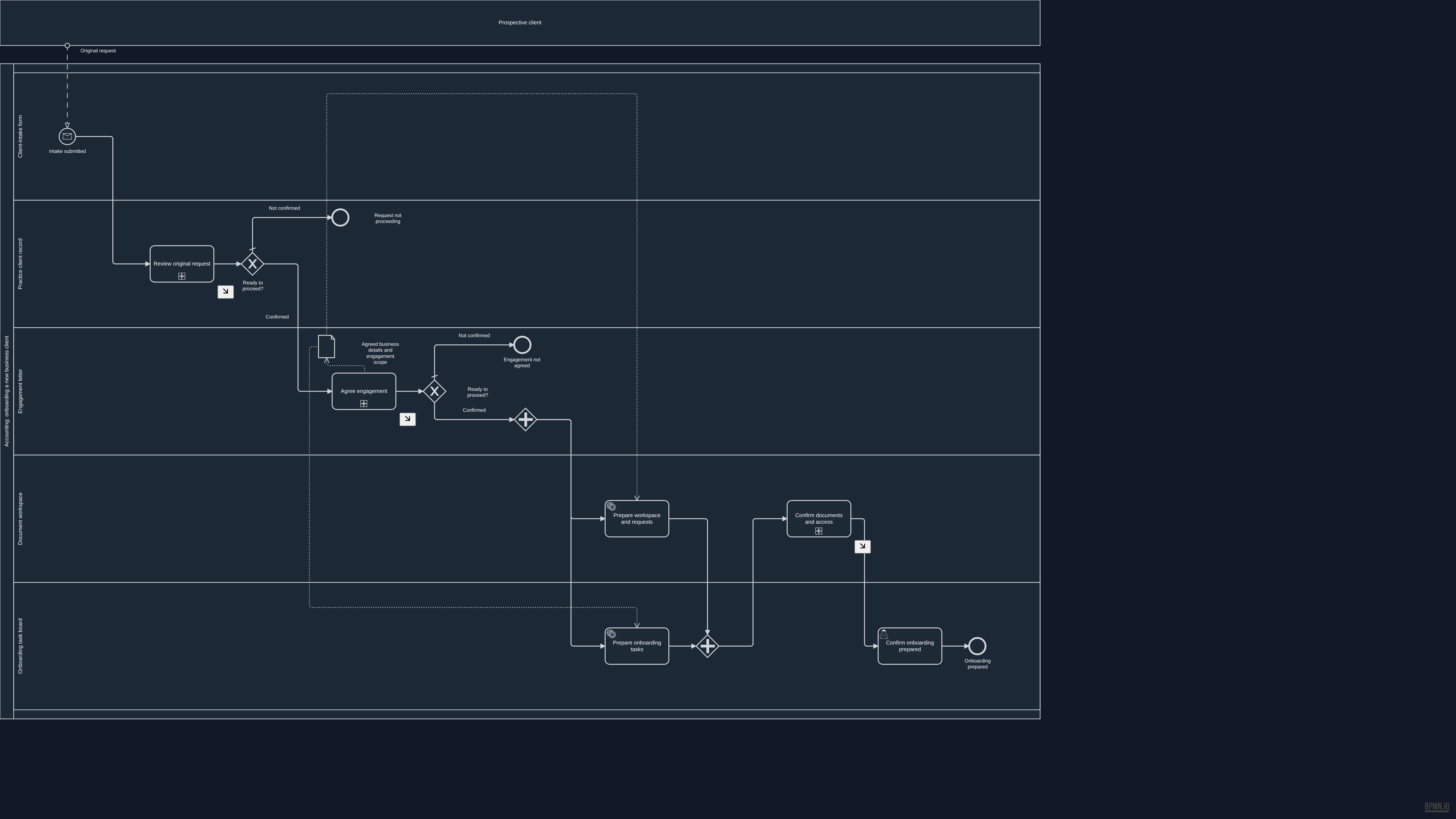
              Overview BPMN diagram for Connected handoffs. The process summary above describes this example.

              Open the full-size overview · Download this BPMN draft snapshot

              Source and validation details

              This reference was prepared from approved unpublished draft faed99c9-1000-495d-93f9-bac512740b3f. The source remains a draft and is not ready for native publication.

              Source BPMN SHA-256
              3fc02439130c46d62141a7eb8f3b4fe1b241093b2f95a9bed1aa2d230d7282f3
              Reference BPMN SHA-256
              3b4d4019dd11b8883ea96756ff715e9e39d5b0f18cad883b9effb8af6bba6538

              The reference removes historical review metadata from the source documentation. The process and diagram layout are unchanged. Native validation recorded the following warnings:

              • QUALITY_GATE_04: Error / Exception Paths: Zero boundary events : no error paths
              • QUALITY_GATE_08: SLA & Timing Metadata: No SLA targets set on any step
              • QUALITY_GATE_09: Edge Routing & Label Clarity: 4/6 gateway edges have labels
              Read this diagram as text

              Activities and decisions

              • Intake submitted (start, Client-intake form)
              • Request not proceeding (end, Practice client record)
              • Engagement not agreed (end, Engagement letter)
              • Prepare workspace and requests (proposed system task, Document workspace)
              • Prepare onboarding tasks (proposed system task, Onboarding task board)
              • parallelGateway (prepare-fork) (parallel split or join, Engagement letter)
              • parallelGateway (prepare-join) (parallel split or join, Onboarding task board)
              • Confirm onboarding prepared (person's task, Onboarding task board)
              • Onboarding prepared (end, Onboarding task board)
              • Review original request (detailed phase, Practice client record)
              • Ready to proceed? (decision, Practice client record)
              • Agree engagement (detailed phase, Engagement letter)
              • Ready to proceed? (decision, Engagement letter)
              • Confirm documents and access (detailed phase, Document workspace)
              • Agreed business details and engagement scope (information)

              Connections

              • Intake submitted → Review original request
              • Prepare workspace and requests → parallelGateway (prepare-join)
              • Prepare onboarding tasks → parallelGateway (prepare-join)
              • parallelGateway (prepare-fork) → Prepare workspace and requests
              • parallelGateway (prepare-fork) → Prepare onboarding tasks
              • parallelGateway (prepare-join) → Confirm documents and access
              • Confirm onboarding prepared → Onboarding prepared
              • Review original request → Ready to proceed?
              • Ready to proceed? → Request not proceeding: Not confirmed
              • Ready to proceed? → Agree engagement: Confirmed
              • Agree engagement → Ready to proceed?
              • Ready to proceed? → Engagement not agreed: Not confirmed
              • Ready to proceed? → parallelGateway (prepare-fork): Confirmed
              • Confirm documents and access → Confirm onboarding prepared

              Incoming messages

              • Prospective client → Intake submitted: Original request

              Information used and produced

              • Prepare workspace and requests uses Agreed business details and engagement scope
              • Prepare onboarding tasks uses Agreed business details and engagement scope
              • Agree engagement creates Agreed business details and engagement scope
              View detailed process diagrams
              Review original request
              Detailed BPMN diagram: Review original request
              Read this diagram as text

              Activities and decisions

              • Phase started (start, Practice client record)
              • Check shared request details (person's task, Practice client record)
              • Request usable? (decision, Practice client record)
              • Clarify request with sender (person's task, Practice client record)
              • Proceed with clarified request? (decision, Practice client record)
              • exclusiveGateway (request-ready) (decision, Practice client record)
              • Needs owner decision (end, Practice client record)
              • Phase ready (end, Practice client record)

              Connections

              • Phase started → Check shared request details
              • Check shared request details → Request usable?
              • Request usable? → exclusiveGateway (request-ready): Usable
              • Request usable? → Clarify request with sender: Needs review
              • Clarify request with sender → Proceed with clarified request?
              • Proceed with clarified request? → exclusiveGateway (request-ready): Confirmed
              • Proceed with clarified request? → Needs owner decision: Not confirmed
              • exclusiveGateway (request-ready) → Phase ready

              Incoming messages

                Information used and produced

                  Agree engagement
                  Detailed BPMN diagram: Agree engagement
                  Read this diagram as text

                  Activities and decisions

                  • Phase started (start, Engagement letter)
                  • Prepare engagement letter (proposed system task, Engagement letter)
                  • Agree engagement scope (person's task, Engagement letter)
                  • Engagement agreed? (decision, Engagement letter)
                  • Clarify services and proposed scope (person's task, Engagement letter)
                  • Agreement now confirmed? (decision, Engagement letter)
                  • exclusiveGateway (agreement-merge) (decision, Engagement letter)
                  • Needs owner decision (end, Engagement letter)
                  • Phase ready (end, Engagement letter)

                  Connections

                  • Phase started → Prepare engagement letter
                  • Prepare engagement letter → Agree engagement scope
                  • Agree engagement scope → Engagement agreed?
                  • Engagement agreed? → exclusiveGateway (agreement-merge): Agreed
                  • Engagement agreed? → Clarify services and proposed scope: Needs clarification
                  • Clarify services and proposed scope → Agreement now confirmed?
                  • Agreement now confirmed? → exclusiveGateway (agreement-merge): Confirmed
                  • Agreement now confirmed? → Needs owner decision: Not confirmed
                  • exclusiveGateway (agreement-merge) → Phase ready

                  Incoming messages

                    Information used and produced

                      Confirm documents and access
                      Detailed BPMN diagram: Confirm documents and access
                      Read this diagram as text

                      Activities and decisions

                      • Phase started (start, Document workspace)
                      • Check documents and permissions (person's task, Document workspace)
                      • Details usable? (decision, Document workspace)
                      • Clarify missing or changed details (person's task, Document workspace)
                      • exclusiveGateway (access-review-merge) (decision, Document workspace)
                      • Phase ready (end, Document workspace)

                      Connections

                      • Phase started → Check documents and permissions
                      • Check documents and permissions → Details usable?
                      • Details usable? → exclusiveGateway (access-review-merge): Usable
                      • Details usable? → Clarify missing or changed details: Clarification needed
                      • Clarify missing or changed details → exclusiveGateway (access-review-merge)
                      • exclusiveGateway (access-review-merge) → Phase ready

                      Incoming messages

                        Information used and produced

                          Start with your work

                          Where does the same information get entered again?

                          Tell Peter what is slowing your business down. He will review your message and reply by email to discuss the next step.

                          Tell Peter about your workflow

                          Digital Sanctum knowledge base

                          Search Digital Sanctum

                          Find services, processes, products, case studies, and strategic intelligence in the site index.

                          Type at least two characters to search the knowledge base.